· 3 min read
Automation with the Secure App Model for CSP's
Microsoft 365 encompasses a wide range of features across many products. Each has one or more individual management portals and PowerShell modules. The fun starts when you want to write a script to execute without human.
Microsoft 365 encompasses a wide range of features across many products. Each has one or more individual management portals and PowerShell modules. The fun starts when you want to write a script to execute without human interaction.
To achieve anything beyond simplistic automation, you’ll quickly realize this isn’t easy. There’s limited guidance, and Microsoft documentation often suggests certain tasks are unsupported. Yet with effort and ingenuity, much can be accomplished.
Our goal is to simplify and automate common administrative tasks for delivering IT services. Atria securely executes prescriptive processes without direct user interaction. Atria users can now safely perform administrative tasks without needing admin permissions or PowerShell expertise—enabling more self-service and reducing low-value work for highly skilled teams.
With the growth of Microsoft 365, we’ve enabled Microsoft CSP Partners to:
- Create new tenants
- Manage users in Azure AD
- Create subscriptions
- Assign licenses
- Manage core Exchange Online features
The Secure App Model
The Secure App Model was introduced to enable CSP partners to administer on behalf of their customers securely.
It relies on Azure AD for access control. A registered Azure AD application, configured with appropriate permissions, operates on behalf of an admin user via a refresh token mechanism. This setup uses:
- Application ID
- Application Secret
- Refresh Token (regularly refreshed)
These secure the connection.
Why is it hard?
While Microsoft guides may help you get started, you’ll encounter obstacles when trying to:
- Modify PowerShell scripts to use the secure app model
- Grant correct resource consents to your app
- Authenticate and execute scripts reliably across various modules
Often, a required PowerShell module won’t support the secure app model or is poorly documented.
What have we done to help?
As a CSP provider, you may need to make configuration changes across APIs. Atria now includes:
- Out-of-the-box support for baseline consents
- Seamless authentication management
This lets you extend standard Atria processes or create your own. Atria ensures your PowerShell connection is pre-configured with the correct security context per tenant/user.
🔑 Key Benefits
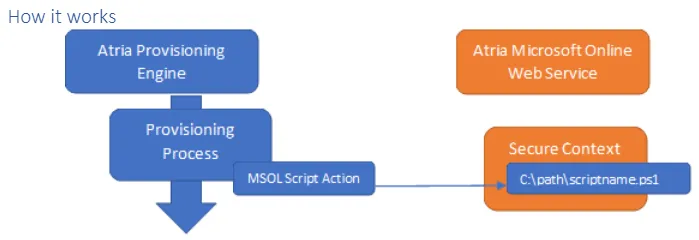
- Execute custom PowerShell scripts during tenant/user provisioning
- Automatic secure connection handling via Atria
Provided Actions
Two Atria actions support this:
- MSOL Run Customer Script – for tenant-wide tasks
- MSOL Run User Script – includes user-level context
✅ Supported API Connections
| Connection | Provider | Use For |
|---|---|---|
| AzureAD | Azure AD PowerShell 2.0 | Azure AD management |
| Exchange | Exchange Online PowerShell | Exchange config (v1 PowerShell) |
| Graph | Microsoft Graph | Graph token access for HTTP requests |
| MSOnline | MS Online v1 | Legacy AzureAD / Office 365 management |
| PartnerCenter | PartnerCenter PowerShell | Manage subscriptions, billing, customer data |
| SecurityCenter | O365 Security & Compliance | Security & compliance configuration |
💡 Available Variables
| Variable | Available When | Description |
|---|---|---|
$CustomerID | Always | Atria Customer ID |
$TenantId | When tenant exists in Azure AD | AzureAD Tenant GUID |
$UserAzureID | When user exists in Azure AD | Azure AD User GUID |
$Session | When Exchange is specified | PowerShell session for Exchange |
$GraphToken | When Graph is specified | Access token for Microsoft Graph |
$SecurityCenterSession | When SecurityCenter is specified | PowerShell session to Security & Compliance |
For existing Atria customers, more detailed documentation is available. If you’re not yet a customer but want to learn more, feel free to get in touch —we’re happy to help without a sales pitch if it’s not a fit.
📚 Additional Resources
- Microsoft 365 with PowerShell for DAP partners
- Secure App Model Partner Docs
- Cyberdrain – Using the Secure App Model
- GCITS – Delegated Tenant Connection Guide
- Paul O’Brien – Secure App Authentication