· 3 min read
What should I automate?
_This article discusses a method for ranking automation projects based on cost/value and a free tool that you can use to help you prioritise your automation work_.

This article discusses a method for ranking automation projects based on cost/value and a free tool that you can use to help you prioritise your automation work.
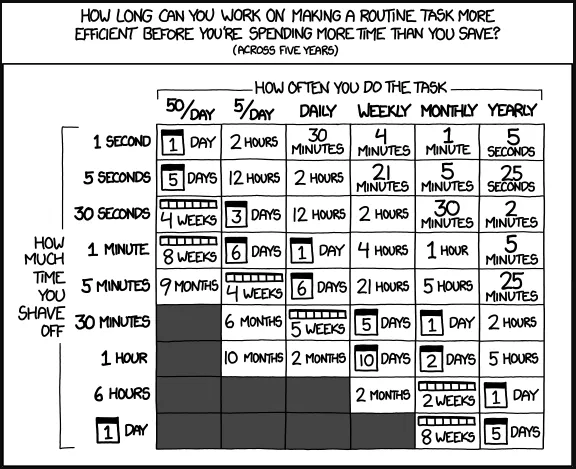
If you haven’t seen this comic from the excellent xkcd blog – it’s really a great starting point for anyone working on process improvement
Improve efficiency, reduce cost but don’t sacrifice quality while getting there; every manager in every business has similar demands placed on them while trying to keep up with business as usual activities. With ongoing skills shortages and margin pressures, it’s no surprise automation is a hot topic - it’s also expensive, time-consuming and often complex.
If you are going to automate or change something and find that it’s easier to find 100s of problems needing solutions, how do you work out if it’s the right thing to focus on
I created a simple spreadsheet that allows you to calculate the ROI for any project, it adds a bit of science to allow you to make better decisions around where to invest in process improvement, it may surprise you what you may learn by using this as it allows you to put a $ figure on a process bottleneck.
If you have developers or staff focused on automation, then you may have something similar. If you don’t, then use this to pick the right focus project to try and move forward alongside BAU.
The spreadsheet uses the following factors to calculate ROI of an automation project:
- The effort taken to complete the task – i.e. it task Bob in Support, 15mins on average to reboot a server.
- The cost rate for the resource performing the task.
- The frequency of the task – i.e. how many times is it repeated.
- The time/effort/cost needed to automate the process.
The spreadsheet allows the data to be entered easily and then calculates a rating based on payback in months.
There are two views – a single project view:
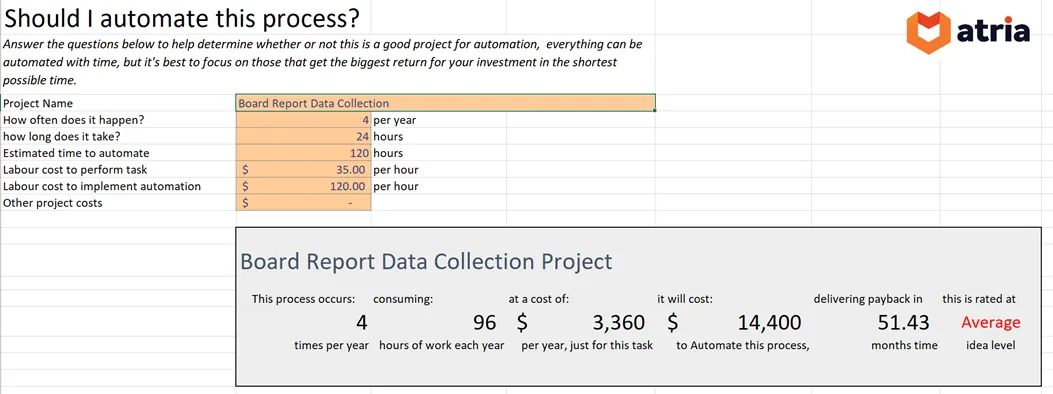
And a more complex multi-line table view:

If you don’t have something like this in place, please download and change it to suit – I guarantee you will learn something by calculating the cost of process vs the cost of automating it.
Aside from costs - I came up with another five important factors to consider when automating a process, the spreadsheet considers the first three of the eight, the others are harder to put $ amounts on!! It is possible that there may be a very high priority task for automation which may not have the best ROI.
- Frequency – how often does it have to be executed?
- Expertise – what skills or resources are needed to complete the task (and associated cost)
- Time – how long the process takes to execute
- Boredom Level – Is this demotivating or tedious for the staff to perform?
- Complexity – how complex or challenging the process is to execute?
- Response – Does the process need to be executed in a timely manner or to an SLA?
- Risk – Is there a human danger or operational risk associated with the current process?
- Feasibility – is it even possible to automate with software?
I will discuss these other factors in a bit more detail in future articles, keen to get any feedback on how you decide what to automate?
Reach out to us to get a copy and learn more.